




Genomic Region & Gene Set Enrichment Analysis & Visualization Workflow for Human and Mouse Genomes.
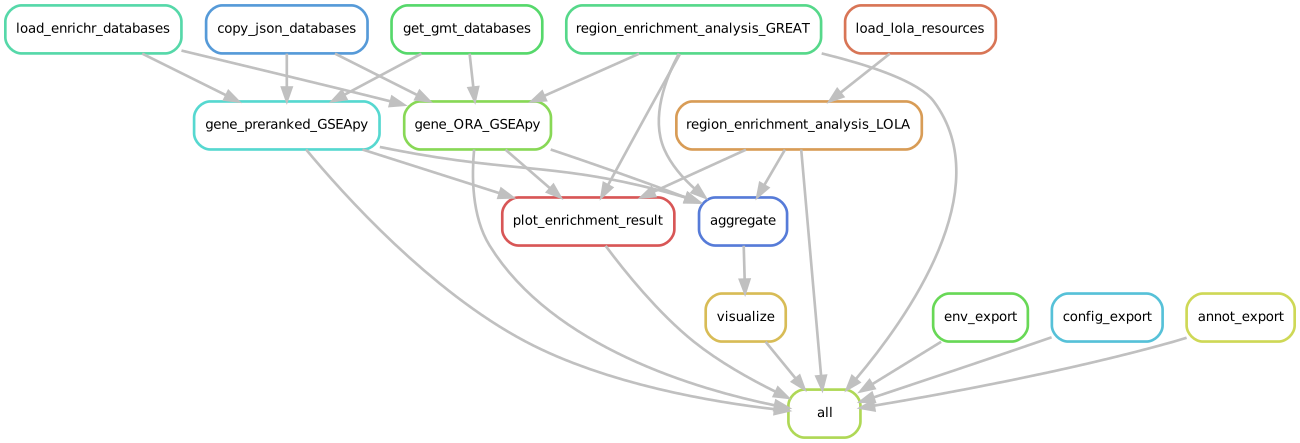
A Snakemake 8 workflow for enrichment analysis and visualization of human (hg19 or hg38) or mouse (mm9 or mm10) based genomic region sets and (ranked) gene sets. Together with the respective background region/gene sets, the enrichment within the configured databases is determined using LOLA, GREAT, GSEApy (over-representation analysis (ORA) & preranked GSEA), pycisTarget, RcisTarget and results saved as CSV files. Additionally, the most significant results are plotted for each region/gene set, database queried, and analysis performed. Finally, the results within the same “group” (e.g., stemming from the same analysis) are aggregated per database and analysis in summary CSV files and visualized using hierarchically clustered heatmaps and bubble plots. For collaboration, communication and documentation of results, methods and workflow information a detailed self-contained HTML report can be generated.
[!NOTE]
This workflow adheres to the module specifications of MrBiomics, an effort to augment research by modularizing (biomedical) data science. For more details, instructions, and modules check out the project’s repository.⭐️ Star and share modules you find valuable 📤 - help others discover them, and guide our focus for future work!
[!IMPORTANT]
If you use this workflow in a publication, please don’t forget to give credit to the authors by citing it using this DOI 10.5281/zenodo.7810621.
🖋️ Authors
- Stephan Reichl
- Martin Stoll
- Raphael Bednarsky
- Fangwen Zhao
- Daria Romanovskaia
- Rob ter Horst
- Christoph Bock
💿 Software
This project wouldn’t be possible without the following software and their dependencies:
| Software | Reference (DOI) |
|---|---|
| Enrichr | https://doi.org/10.1002/cpz1.90 |
| ggplot2 | https://ggplot2.tidyverse.org/ |
| GREAT | https://doi.org/10.1371/journal.pcbi.1010378 |
| GSEA | https://doi.org/10.1073/pnas.0506580102 |
| GSEApy | https://doi.org/10.1093/bioinformatics/btac757 |
| LOLA | https://doi.org/10.1093/bioinformatics/btv612 |
| pandas | https://doi.org/10.5281/zenodo.3509134 |
| pheatmap | https://cran.r-project.org/package=pheatmap |
| pycisTarget | https://doi.org/10.1038/s41592-023-01938-4 |
| RcisTarget | https://doi.org/10.1038/nmeth.4463 |
| rGREAT | https://doi.org/10.1093/bioinformatics/btac745 |
| Snakemake | https://doi.org/10.12688/f1000research.29032.2 |
🔬 Methods
This is a template for the Methods section of a scientific publication and is intended to serve as a starting point. Only retain paragraphs relevant to your analysis. References [ref] to the respective publications are curated in the software table above. Versions (ver) have to be read out from the respective conda environment specifications (workflow/envs/*.yaml file) or post-execution in the result directory (enrichment_analysis/envs/*.yaml). Parameters that have to be adapted depending on the data or workflow configurations are denoted in squared brackets e.g., [X].
The outlined analyses were performed using the programming languages R (ver) [ref] and Python (ver) [ref] unless stated otherwise. All approaches statistically correct their results using expressed/accessible background genomic region/gene sets from the respective analyses that yielded the query region/gene sets.
Genomic region set enrichment analyses
LOLA. Genomic region set enrichment analysis was performed using LOLA (ver) [ref], which uses Fisher’s exact test. The following databases were queried [lola_databases].
GREAT. Genomic region set enrichment analysis was performed using GREAT [ref] implemented with rGREAT (ver) [ref]. The following databases were queried [local_databases].
pycisTarget. Genomic region set TFBS (Transcription Factor Binding Site) motif enrichment analysis was performed using pycisTarget (ver) [ref]. The following databases were queried [pycisTarget_databases].
Furthermore, genomic regions (query- and background-sets) were mapped to genes using GREAT (without background) and then analyzed as gene sets as described below for a complementary perspective.
Gene set enrichment analyses (GSEA)
Over-representation analysis (ORA). Gene set ORA was performed using Enrichr [ref], which uses Fisher’s exact test (i.e., hypergeometric test), implemented with GSEApy’s (ver) [ref] function enrich. The following databases were queried [local_databases].
Preranked GSEA. Preranked GSEA was performed using GSEA [ref], implemented with GSEApy’s (ver) [ref] function prerank. The following databases were queried [local_databases].
RcisTarget. Gene set TFBS (Transcription Factor Binding Site) motif enrichment analysis was performed using RcisTarget (ver) [ref]. The following databases were queried [RcisTarget_databases].
Aggregation The results of all queries belonging to the same analysis [group] were aggregated by method and database yielding one aggregated table that is the complete concatenation of every query’s full result table.
Visualization All analysis results were visualized in the same way.
For each query, method and database combination an enrichment dot plot was used to visualize the most important results. The top [top_n] terms were ranked (along the y-axis) by the mean rank of statistical significance ([p_value]), effect-size ([effect_size]), and overlap ([overlap]) with the goal to make the results more balanced and interpretable. The significance (adjusted p-value) is denoted by the dot color, effect-size by the x-axis position, and overlap by the dot size. Note that in any output file in this module, the regions are indexed with the BED indexing convention, i.e the start is 0-based and inclusive while the end is exclusive ([start, end), a region with start=0 and end=100 spans exactly 100 bases: positions 0 to 99).
The aggregated results per analysis [group], method and database combination were visualized using hierarchically clustered heatmaps and bubble plots. The union of the top [top_terms_n] most significant terms per query were determined and their effect-size and significance were visualized as hierarchically clustered heatmaps, and statistical significance ([adj_pvalue] < [adjp_th]) was denoted by *. Furthermore, a hierarchically clustered bubble plot encoding both effect-size (color) and statistical significance (size) is provided, with statistical significance denoted by *. All summary visualizations’ values were capped by [adjp_cap]/[or_cap]/[nes_cap] to avoid shifts in the coloring scheme caused by outliers.
The analysis and visualizations described here were performed using a publicly available Snakemake (ver) [ref] workflow [10.5281/zenodo.7810621].
🚀 Features
The five tools LOLA, GREAT, pycisTarget, RcisTarget and GSEApy (over-representation analysis (ORA) & preranked GSEA) are used for various enrichment analyses. Databases to be queried can be configured (see ./config/config.yaml). All approaches statistically correct their results using the provided background region/gene sets and multiple testing correction.
- enrichment analysis methods sorted by input data type and analysis method
- genomic region set (
\*.bed)- LOLA: Genomic Locus Overlap Enrichment Analysis is run locally using configured databases (
lola_databases) taken from LOLA Region Databases or custom created using these instructions - GREAT using rGREAT: Genomic Regions Enrichment of Annotations Tool runs locally using configured databases (
local_databases), additional resources are downloaded automatically during the analysis. - pycisTarget: Motif enrichment analysis in region sets to identify high confidence transcription factor (TF) cistromes is run locally using configured databases (
pycistarget_parameters:databases) from the cisTarget resources.
- LOLA: Genomic Locus Overlap Enrichment Analysis is run locally using configured databases (
- gene set (
\*.txt) over-representation analysis (ORA_GSEApy)- GSEApy enrich() function performs Fisher’s exact test (i.e., hypergeoemtric test) and is run locally using configured databases (
local_databases). - RcisTarget: Motif enrichment analysis in gene sets to identify high confidence transcription factor (TF) cistromes is run locally using configured databases (
Rcistarget_parameters:databases) from the cisTarget resources.
- GSEApy enrich() function performs Fisher’s exact test (i.e., hypergeoemtric test) and is run locally using configured databases (
- genomic region-based gene set (
\*.bed) over-representation analysis (ORA_GSEApy) & TFBS motif enrichment analysis (RcisTarget)- region-gene associations for each query and background region set are obtained using (r)GREAT, without accounting for background for improved performance and more genes. Correction for background is anyway included in the gene-based analyses downstream.
- they are used for a complementary ORA using GSEApy and TFBS motif enrichment analysis using RcisTarget, but do not replace the dedicated region-based analysis tools
- thereby an additional enrichment perspective for region sets can be gained through association to genes by querying the same and/or more databases, that are not supported/provided by region-based tools.
- preranked gene set (
\*.csv) enrichment analysis (preranked_GSEApy)- GSEApy prerank() function performs preranked GSEA and is run locally using configured databases (
local_databases). - Note: only entries with the largest absolute score are kept and +/- infinity values are set to max/min, respectively.
- GSEApy prerank() function performs preranked GSEA and is run locally using configured databases (
- genomic region set (
- databases have to be provided by the user
- databases (
local_databases) for rGREAT and GSEApy - LOLA databases for LOLA
- downloaded from LOLA Region Databases
- custom databases created using these [instructions]
- pre-cached databases as .RData files are supported by simpleCache
- cisTarget databases for pycisTarget and RcisTarget
- downloaded from the cisTarget resources
- custom databases using these instructions
- databases (
- group aggregation of results per method and database
- results of all queries belonging to the same group are aggregated per method (e.g., ORA_GSEApy) and database (e.g., GO_Biological_Process_2021) by concatenation and saved as a long-format table (CSV). We recommend this as the starting point for downstream analyses.
- visualization
- region/gene set specific enrichment dot plots are generated for each query, method and database combination
- the top
{top_n}terms are ranked (along the y-axis) by the mean rank of statistical significance ({p_value}), effect-size ({efect_size}e.g., log2(odds ratio) or normalized enrichemnt scores), and overlap ({overlap}e.g., coverage or support) with the goal to make the ranking more balanced and interpretable - significance (adjusted p-value) is presented by the dot color
- effect-size is presented by the x-axis position
- overlap is presented by the dot size
- the top
- group summary/overview
- two plots:
- top terms: the union of the top
{top_terms_n}most significant terms per query, method, and database within a group is determined. - specific terms: the union of statistically significant terms with the lowest average significance across all other groups is determined. This plot is empty if no statistically significant terms are found.
- top terms: the union of the top
- a hierarchically clustered bubble plot encoding both effect-size (color) and significance (size) is provided, with statistical significance denoted by
\*(PNG). - all summary visualizations are configured to cap the values (
{adjp_cap}/{or_cap}/{nes_cap}) to avoid shifts in the coloring scheme caused by outliers.
- two plots:
- region/gene set specific enrichment dot plots are generated for each query, method and database combination
- results (
{result_path}/enrichment_analysis) - the result directory contains a folder for each genomic-region/gene set
{query}and{group}{query}/{method}/{database}/containing:- result table (CSV):
{query}\_{database}.csv - enrichment dot plot (PNG):
{query}\_{database}.{png}
- result table (CSV):
{group}/{method}/{database}/containing- aggregated result table (CSV):
{group}\_{database}\_all.csv - hierarchically clustered bubble plots simultaneously visualizing statistical significance and effect-sizes (PNG):
{group}\_{database}\_summary_{topTerms|specificTerms}.{png}. In case of only one query gene/region set, this plot is empty.
- aggregated result table (CSV):
- Additional method-specific outputs are provided :
- GREAT genomic-region enrichment:
- in addition to the standard GREAT statistics, the workflow adds two extra columns to the result table:
regions: the associated query regions for a term, written in BED-like coordinate formannotated_genes: the genes associated to those regions for that term
great_parameters:map_associated_regionscontrols how many top significant terms (ranked by the configured adjusted p-value column) are annotated. Supported values:- 0: do not annotate GREAT terms with associated regions/genes
- positive integer, for example 5: annotate that many top significant terms ranked by the configured adjusted p-value column
- -1: annotate all significant terms, restoring the previous behavior
⚠️ Warning This annotation can take a long time, substantially increase individual GREAT result file size, and may break Excel usage because Excel limits cell contents to 32,767 characters.
- additional results from the region-gene association provided by GREAT:
genes.txt: list of genes associated with the query regionsregion_gene_associations.csv: region-to-gene assignment tableregion_gene_associations.pdf: visualization of the region-gene associations- these files complement GREAT’s main result table by detailing the region-to-gene mapping, which is also used downstream
- in addition to the standard GREAT statistics, the workflow adds two extra columns to the result table:
- pycisTarget genomic-region enrichment: additional results
{query}_{database}.motif_hits.csv: detailed motif-hit table extracted from the HDF5 result object; it reports which query regions are linked to the enriched motifs.{query}_{database}.cistromes.csv: TF-associated cistrome table extracted from the HDF5 pycisTarget result. Each row links a TF-associated cistrome to a database region and the overlapping query region. It represents region-level matches for TFs supported by the enrichment results.motif_enrichment_cistarget_{query}.hdf5: the full pycisTarget result objectmotif_enrichment_cistarget_{query}.html: the interactive pycisTarget HTML report
- GREAT genomic-region enrichment:
Note:
- Despite usage of the correct parameter, rGREAT was not using the provided cores during testing. Nevertheless, it is still provided as parameter.
- (r)GREAT performs two statistical test (binomial and hypergeometric), results of both are reported and should be considered. Which results are used for the visualization can be configured in
column_names:GREAT. - pycisTarget for region set enrichment does not use the provided background regions. In case this is desired (e.g., consensus regions or TF ChIP-seq data) follow the instructions for custom cisTarget databases using your own regions and use them as database.
🛠️ Usage
Here are some tips for the usage of this workflow:
- Download all relevant databases (see Resources).
- Configure the desired analyses based on input data type and question using the configuration YAML and an annotation file (see Configuration)
- Run the analysis for every query gene/region set of interest (e.g., results of differential analyses) with the respective background genes/regions (e.g., all expressed genes or consensus regions).
- generate the Snakemake Report
- look through the overview plots of your dedicated groups and queried databases in the report
- dig deeper and investigate interesting hits further by looking at the
- aggregated result table underlying the summary/overview plot
- enrichment plots for the individual query sets
⚙️ Configuration
Detailed specifications can be found here ./config/README.md
🧬 How to convert feature lists to BED files
This enrichment analysis workflow requires genomic regions to be in standard BED format. At minimum, provide the first 3 BED columns: chromosome, start, end. A 4th column such as name is optional but often useful. BED uses 0-based, start-inclusive, end-exclusive coordinates ([start, end)). However, upstream differential analysis workflows (e.g., using limma) often produce a simple text file containing only a list of significant feature IDs (e.g., peak_1024, peak_5531). To use these results, you must first convert this list of IDs into a valid BED file by mapping each ID to its genomic coordinates.
We provide a Python helper script, features_to_bed.py, and a Snakemake rule to automate this crucial step. Simply adapt them to your setup. Both take two files as input:
- Your list of significant feature IDs (e.g.,
features.txt). - An annotation file that contains the genomic coordinates for all features in your experiment (e.g.,
consensus_annotation.csv).
Both implementations merge these files, finds the coordinates for your significant features, and saves them in the required BED format. In the Snakemake rule input and output paths can be replaced with wildcards to fit your analysis.
rule convert_features2bed:
    input:
        consensus_annotation = "path/to/consensus_annotation.csv",
        features_txt = "path/to/dea_limma/features.txt",
    output:
        features_bed = "path/to/features.bed",
    params:
        region_col = "peak_id",
        chr_col = "gencode_chr",
        start_col = "gencode_start",
        end_col = "gencode_end",
    run:
        # load files as pandas df
        consensus_df = pd.read_csv(input.consensus_annotation)
        features_df = pd.read_csv(input.features_txt, header=None, names=[params.region_col])
        # map using params
        merged_df = pd.merge(features_df, consensus_df, on=params.region_col, how="inner")
        # Select and order the columns required for the BED file format.
        bed_df = merged_df[[params.chr_col, params.start_col, params.end_col, params.region_col]]
        # save in BED format
        bed_df.to_csv(output.features_bed, sep="\t", header=False, index=False)
📖 Examples
Explore detailed examples showcasing module usage in our comprehensive end-to-end MrBiomics Recipes, including data, configuration, annotation and results:
- ATAC-seq Analysis Recipe
- RNA-seq Analysis Recipe
- Integrative Analysis Recipe
- scRNA-seq Analysis Recipe
- scCRISPR-seq Analysis Recipe
Additionally, we provide a minimal example that tests all features of this workflow using intermediate results from the MrBiomics ATAC-seq and RNA-seq recipes. Briefly, the input data consist of 4 feature sets (2 genomic region sets, 2 ranked gene lists) of B cell and erythroid cell-specific transcriptional/epigenetic differences, compared to all other hematopoietic cell types, within the Corces et al. (2016) dataset, determined using our dea_limma module.
The example is configured using config/config.yaml and config/annotation.csv, and restores test data and resources from test/compressed_resources and the web. Run this test to confirm that your setup is working, and to get familiar with the workflow’s features.
Follow these steps to run the complete analysis:
- Restore the minimal test data and resources
# enter enrichment_analysis directory cd enrichment_analysis # extract the input data and libraries bash test/setup_test_resources.sh - Activate your conda Snakemake environment, run a dry-run, run the workflow and generate the report
 conda activate snakemake
 # dry-run
 snakemake -p --use-conda -n
 # real run
 snakemake -p --use-conda --cores=1
 # report
 snakemake --report test/report.html
With one core this should finish within ~20 minutes.
[!IMPORTANT] The 3 cisTarget resource files used in the test are synthetic. They were created to test all features, but they are not biologically meaningful and must not be used for real analyses.
🔗 Links
📚 Resources
- Helper scripts
- Combine all text files within a specified folder into one JSON to be used as database.
- Generate a file listing CSV of the current folder as basis for the annotation file.
- Convert feature lists to BED files for genomic region enrichment analysis.
- Snakemake rule templates for automated database downloads
- Recommended compatible MrBiomics modules for upstream processing and analyses:
- ATAC-seq Processing to quantify chromatin accessibility.
- scRNA-seq Data Processing & Visualization for processing (multimodal) single-cell transcriptome data.
- Split, Filter, Normalize and Integrate Sequencing Data after count quantification.
- Differential Analysis with limma to identify and visualize statistically significantly different features (e.g., genes or genomic regions) between sample groups.
- Differential Analysis using Seurat to identify and visualize statistically significantly different features (e.g., genes or proteins) between groups.
- Package for simplifying enrichment results using the ComplexHeatmap package.
- Web versions of some of the used tools
- Databases & resources for region/gene sets
📑 Publications
The following publications successfully used this module for their analyses.
- Datlinger, Pankevich, Arnold et al. (2025) Nature - Systematic discovery of CRISPR-boosted CAR T cell immunotherapies
- Traxler, Reichl et al. (2025) Cell Systems - Integrated time-series analysis and high-content CRISPR screening delineate the dynamics of macrophage immune regulation